Role Based Access Control for Applications in Exchange Online
This article will guide you through using granular and scalable, resource-scoped access control: Role Based Access Control (RBAC) for Applications in Exchange Online.
Overview
RBAC for Applications in Exchange Online allows admins to grant permissions to an application that's independently accessing data in Exchange Online. This grant can be paired with a scope of access (resource scope) to specify which mailboxes an app can access. This feature extends the current RBAC model in Exchange Online and it replaces Application Access Policies.
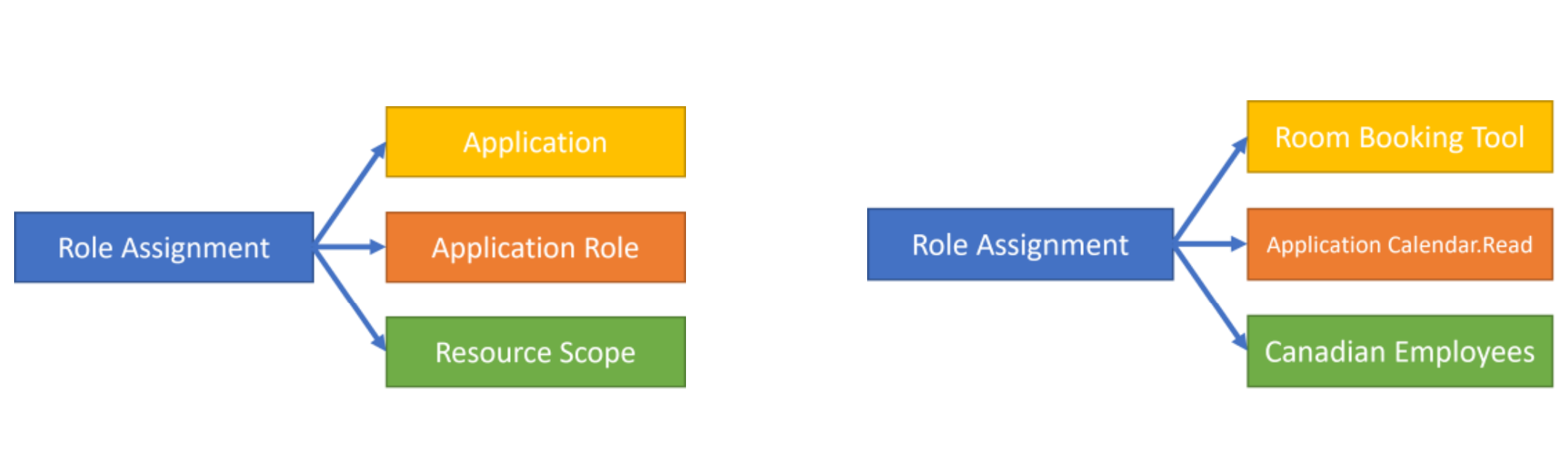
At the core of this system is the management role assignment configuration, which expresses an admin's intent to allow a principal to access data. In this case, allowing an app to perform some role against a set of target resources. For example an admin might configure a room booking system with access to calendar data only in specific regions using a Management Scope. See the diagram below illustrating the role assignment model:
Configuration Instructions
The following steps will guide you to create these Application RBAC assignments:
- Create a new resource scope (optional)
- Create a pointer to a Microsoft Entra service principal
- Select the appropriate application role
- Create a New Role assignment
- Test the New Service principal
Requirements
The Organization Management role group has the delegating role assignment for the new Application RBAC roles. You need to be a member of the Organization Management role group to assign these permissions. Alternatively, you can use Exchange Online RBAC to grant delegating assignments to these application roles as you see fit. In Microsoft Entra ID, you need the Exchange Administrator role to assign these permissions.
Define Resource Scope
- Management Scopes: An Exchange entity that represents a set of mailboxes using a filter expression on the properties of those mailboxes.
- Admin Units: A Microsoft Entra resource that can be a container for other Microsoft Entra resources that contains only users groups, or devices. To know more, see Administrative units in Microsoft Entra ID and Create or delete administrative units.
Management Scopes
Management scopes allow an admin to scope a set of mailboxes based on the properties of these objects. Refer to the Management Scope documentation for add, remove, set. Here's a list of the filterable properties in a Management Scope.
Note
While there's a property called Administrative Units, we recommend you use the native Admin Units parameter on a role assignment to avoid creating a scope as an intermediary pointer object.
Service Principals
Service Principals represent an instance of an application within your tenant. You should consider the Service Principal in Exchange to be a pointer to an existing Service Principal in Microsoft Entra ID. Service Principals can't be created directly using Exchange Online tools. Microsoft Entra tools are used to manage Service Principal registrations within tenants. Exchange prevents the creation of an invalid pointer and reflects any deletions of Service Principals in Microsoft Entra ID automatically.
New Service Principal
New-ServicePrincipal -AppId <Client Application ID in AAD> -ObjectId <Service principal object ID in AAD> -DisplayName <name>
The following screenshot will help you find these IDs in Microsoft Entra ID:

Note
Don't use the IDs from the App Registrations page, as it shows different values. The red outlined "Application ID" is the AppID and the "Object ID" is the ServiceID.
You can use another approach to find these IDs using Get-MgServicePrincipal.
Remove Service Principal
Remove-ServicePrincipal -Identity <ObjectID, AppID, or DisplayName>
Set Service Principal
Set-ServicePrincipal -Identity <ObjectID, AppID, or DisplayName > -DisplayName <Updated name>
Application Roles
Application roles are a special type of management role in Exchange Online, which is only assignable to an Application. These roles can be enumerated using Get-ManagementRole.
Role Assignments
Management role assignments tie together a principal, role, and custom resource scope of access. This assignment acts as the permissions assignment for a service principal performing a role across a scope.
New Role Assignment
New-ManagementRoleAssignment [[-Name] <String>] -Role <RoleIdParameter> -App <ObjectID, AppID, or DisplayName> -CustomResourceScope <Management Scope> (or -RecipientAdministrativeUnitScope)
Set Role Assignment
Set-ManagementRoleAssignment [-Identity] <RoleAssignmentIdParameter> -CustomResourceScope <Management Scope> (or -RecipientAdministrativeUnitScope)
Remove Role Assignment
For removing a role assignment, see remove management assignment.
Testing Authorization
A test cmdlet can be used to simulate the behavior enabled by RBAC assignments for a particular service principal.
Note
This method excludes permissions that might be granted separately in Microsoft Entra ID.
When testing authorization, you can include an optional resource parameter to evaluate which scoped permissions apply to that target mailbox. InScope will = true or false to represent if, true that permission applies to that mailbox for that service principal, or false that service principal has that permission but not over that particular mailbox. Omitting this flag will result in "Not Run."
Test results always include the allowed resource scope for a particular assigned permission.
Test Service Principal Access
Test-ServicePrincipalAuthorization -Identity <ObjectID, AppID, or DisplayName> [-Resource] <target mailbox>
Examples
After using Connect-ExchangeOnline in PowerShell, follow these steps:
Example One: Configuring calendar read access for Canadian employees using a management scope
New-ServicePrincipal -AppId 71487acd-ec93-476d-bd0e-6c8b31831053 -ObjectId 6233fba6-0198-4277-892f-9275bf728bcc -DisplayName "example"

DisplayName   ObjectId                              AppId
-----------   ---------                              -----
example       6233fba6-0198-4277-892f-9275bf728bcc   71487acd-ec93-476d-bd0e-6c8b3183105
New-ManagementScope -Name "Canadian employees" -RecipientRestrictionFilter "CustomAttribute1 -eq '012332'"

Name                 ScopeRestrictionType      Exclusive      RecipientRoot          RecipientFilter
----                 --------------------      ---------      -------------          ---------------
Canadian employees    RecipientScope            False                                CustomAttribute1 -eq '012332'
New-ManagementRoleAssignment -App 6233fba6-0198-4277-892f-9275bf728bcc -Role "Application Calendars.Read" -CustomResourceScope "Canadian Employees"

Name                      Role                 RoleAssigneeName       RoleAssigneeType        AssignmentMethod
----                      ----                 ----------------       ----------------        ----------------
Application Calendar...   Application Ca...    6233fba6-0198-...      ServicePrincipal        Direct
Example Two: Configuring Mail.Read for all Europe Admin Unit mailboxes
New-ServicePrincipal -AppId eb19847b-5563-42ea-b719-ea47cb0cf4b3 -ObjectId 59b7c6cb-58d3-4ee8-a409-8c1f9dbb5d36 -DisplayName "example"

DisplayName    ObjectId                                  AppId
-----------    ---------                                  -----
example        59b7c6cb-58d3-4ee8-a409-8c1f9dbb5d36       eb19847b-5563-42ea-b719-ea47cb0cf4b3
New-ManagementRoleAssignment -App 59b7c6cb-58d3-4ee8-a409-8c1f9dbb5d36 -Role "Application Mail.Read" -RecipientAdministrativeUnitScope 4d819ce9-9257-44d7-af20-68a49e6697f4

Name                         Role                RoleAssigneeName         RoleAssigneeType             AssignmentMethod
----                         ----                ----------------          ----------------            ----------------
Application Mail.Rea...      Application Ma...   59b7c6cb-58d3-...         ServicePrincipal            Direct
Example Three: Testing permissions assigned to a service principal
Test-ServicePrincipalAuthorization -Resource b -Identity "DemoB" | Format-Table

RoleName                      GrantedPermissions          AllowedResourceScope        ScopeType                 InScope
--------                      ------------------          --------------------        ---------                 ------
Application Mail.Read         Mail.Read                   Scope-MESGaDN                CustomRecipientScope     False
Application Calendars.Read    Calendars.Read              Scope-DL1                    CustomRecipientScope     False
Application Contacts.Read     Contacts.Read               Scope-MESGa                  CustomRecipientScope     False
Limitations
- Applications can't become member of a Role Group.
- Application roles can only be assigned to Service Principals.
- Application roles can't be copied or derived.
- Exclusive management scopes don't restrict app access.
- Changes to app permissions are subject to cache maintenance that varies between 30 minutes and 2 hours depending on the app's recent usage. When testing configurations, the test command bypasses this cache. An app with no inbound calls to APIs will have its cache reset in 30 minutes, whereas an actively used app will keep its cache alive for up to 2 hours.
Supported Protocols
- MS Graph
- EWS
Supported Application Roles
| Name | Protocol | Permissions List | Description |
|---|---|---|---|
| Application Mail.Read | MS Graph | Mail.Read | Allows the app to read email in all mailboxes without a signed-in user. |
| Application Mail.ReadBasic | MS Graph | Mail.ReadBasic | Allows the app to read email except the body, previewBody, attachments, and any extended properties in all mailboxes without a signed-in user |
| Application Mail.ReadWrite | MS Graph | Mail.ReadWrite | Allows the app to create, read, update, and delete email in all mailboxes without a signed-in user. Doesn't include permission to send mail. |
| Application Mail.Send | MS Graph | Mail.Send | Allows the app to send mail as any user without a signed-in user. |
| Application MailboxSettings.Read | MS Graph | MailboxSettings.Read | Allows the app to read user's mailbox settings in all mailboxes without a signed-in user. |
| Application MailboxSettings.ReadWrite | MS Graph | MailboxSettings.ReadWrite | Allows the app to create, read, update, and delete user's mailbox settings in all mailboxes without a signed-in user. |
| Application Calendars.Read | MS Graph | Calendars.Read | Allows the app to read events of all calendars without a signed-in user. |
| Application Calendars.ReadWrite | MS Graph | Calendars.ReadWrite | Allows the app to create, read, update, and delete events of all calendars without a signed-in user. |
| Application Contacts.Read | MS Graph | Contacts.Read | Allows the app to read all contacts in all mailboxes without a signed-in user. |
| Application Contacts.ReadWrite | MS Graph | Contacts.ReadWrite | Allows the app to create, read, update, and delete all contacts in all mailboxes without a signed-in user. |
| Application Mail Full Access | MS Graph | Mail.ReadWrite, Mail.Send | Allows the app to create, read, update, and delete email in all mailboxes and send mail as any user without a signed-in user. |
| Application Exchange Full Access | MS Graph | Mail.ReadWrite, Mail.Send, MailboxSettings.ReadWrite, Calendars.ReadWrite, Contacts.ReadWrite | Without a signed-in user: Allows the app to create, read, update, and delete email in all mailboxes and send mail as any user. Allows the app to create, read, update, and delete user's mailbox settings in all mailboxes. Allows the app to create, read, update, and delete events of all calendars. Allows the app to create, read, update, and delete all contacts in all mailboxes. |
| Application EWS.AccessAsApp | EWS | EWS.AccessAsApp | Allows the app to use Exchange Web Services with full access to all mailboxes. |
You might notice these roles represent Microsoft Graph permissions that you can consent elsewhere in the Azure Identity platform. These permissions will have the same effect as those Graph permissions except for these role assignments allowing for granular resource scoped access.
FAQ
Why does my application still have access to mailboxes that aren't granted using RBAC?
You need to ensure that you've removed the tenant-wide unscoped permissions you assigned in Microsoft Entra ID. The permissions assigned using RBAC act in addition to grants you make in Microsoft Entra ID. Microsoft Entra permissions can only be constrained using Application Access Policies.
How can I view and modify all application permissions in one interface?
To ensure admins have a consolidated view of app permissions, we'll be surfacing these permissions granted in Exchange Online in a Microsoft Entra admin experience. This feature is upcoming, stay tuned.
How to migrate from Application Access Policies to RBAC for Applications?
With Application Access Policies, you have a service principal, permissions consent in Azure, and a policy associated with a service principal in Exchange Online. While you can restructure your scoping mechanism in any way that works well for you by using Exchange Management Scopes or Administrative Units, here's some guidance on reusing groups in an App Access Policy as the scope for your RBAC for Applications grant. This process will not result in any interruption of use for your app.
Migration steps:
- Create a new management scope, which points to the scoping group from the Application Access Policy
- Create the service principal pointer object
- Assign the needed permissions to the service principal in Exchange Online with the management scope restriction
- Remove consent to permission in Azure
- Remove the Application Access Policy
When creating the management scope in step #1, you'll use a recipient filter with the filter parameter MemberOfGroup. Here's an example: "MemberOfGroup -eq 'CN=mesga20220818210551,OU=Fabrikam346.onmicrosoft.com,OU=Microsoft Exchange Hosted Organizations,DC=NAMPR00A001,DC=prod,DC=outlook,DC=com'"
Note
This filter parameter uses the distinguished name of the group, which you can find using Get-Group cmdlets.
Limitations:
- Nested group members are considered out of scope. Only direct group membership results in the member being considered in scope for the authorization.
- Microsoft 365 Groups, Mail-Enabled Security Groups, and Distribution Lists are supported.
How does RBAC for Applications work alongside Application Access Policies?
Compatibility with App Access Policy
RBAC for Applications replaces Application Access Policies.
The Authorization interoperability can be described as follows:
Application Access Policies constrain ONLY the permissions assigned in Microsoft Entra ID.
RBAC for Applications offers an alternate expression of authorization with an associated resource scope.
An app can have both Microsoft Entra consented permissions and RBAC assignments. We expect this case when an app has tenant wide Mail.Read and scoped Mail.Send, for example.
Permission consents are additive.
Example One: consents from 2 systems
- An app has Mail.Read in Microsoft Entra ID
- This app is scoped to mail-enabled security group 1 using an Application Access Policy
- The same app has Calendar.Read consented for Management Scope 1 in RBAC for Applications
- Mailbox A is in mail-enabled security group 1
- Mailbox B is in scope for Management Scope 1
MS Graph access to an endpoint requiring both Mail.Read and Calendar.Read for App 1:
- Targeting Mailbox A: fails
- Targeting Mailbox B: fails
This endpoint needs both Mail.Read and Calendar.Read. While the app has these permissions individually against two separate mailboxes, it doesn't have both permissions against one mailbox.
Example Two: assigning the same permission twice
- An app has Mail.Read in Microsoft Entra ID
- This app is scoped to mail-enabled security group 1 using an Application Access policy
- The same app has Mail.Read consented for Management Scope 1 using RBAC for Applications
- Mailbox A is in mail-enabled security group 1
- Management Scope 1 allows access to every mailbox except Mailbox A (according to some filter like 'Alias -ne mbxa')
MS Graph access to an endpoint requiring Mail.Read for App 1:
- Targeting Mailbox A: allow
- Targeting Mailbox B: allow
While the Mail.Read from Microsoft Entra-only allows access to Mailbox A, the RBAC assignment allows access to everything except A. In effect, this allows access to everything because "A and Not A" means everything.
While we've outlined these edge cases for completeness, we don't expect Application Access Policies to be typically used with RBAC for Applications. Tenant-wide permissions should be assigned in Microsoft Entra ID while resource-scoped permissions should be granted using RBAC for Applications.
How many applications are supported by RBAC for Applications?
You can have up to 10,000 applications per tenant using RBAC for Applications. Let us know if this limit poses a problem for you. We've built RBAC for Applications in a highly scalable way to accommodate the needs of our largest customers.
Why is autodiscover not working?
The AutoDiscover service can't be accessed when using RBAC Application roles due to a bug which is being addressed.
If I delete a service principal in Entra what happens in Exchange?
Deleted service principals in Entra are also removed in Exchange automatically. This will delete any assignments made to these service principals but leave management scopes unaffected.
Feedback on this feature
Feedback on this feature can be shared with exoapprbacpreview@microsoft.com.
Related Articles
Authentication and authorization basics
Microsoft Graph is a protected API gateway for accessing data in Microsoft cloud services like Microsoft Entra ID and Microsoft 365. It's protected by the Microsoft identity platform, which authorizes and verifies that an app is authorized to call ...Resolve Microsoft Graph authorization errors
Authorization errors can occur as a result of several different issues, most of which generate a 403 error (with a few exceptions). For example, the following can all lead to authorization errors: Incorrect access token acquisition flows Poorly ...Overview of Microsoft Graph permissions
Before the Microsoft identity platform can authorize your app to access data in the Microsoft cloud, you must grant the app the privileges it needs. Similarly, before the Microsoft identity platform can authorize your app to access data through ...Call Microsoft Graph from a Cloud Solution Provider application
Note: This topic applies only to Microsoft Cloud Solution Provider (CSP) application developers. The Microsoft Cloud Solution Provider (CSP) program enables Microsoft's partners to resell and manage Microsoft Online services to customers. This ...Microsoft Graph authentication and authorization overview
Learn how to authenticate and get your app authorized to securely access data through Microsoft Graph. Explore concepts for building and authorizing apps that call Microsoft Graph, and efficiently managing app access. Get started Concept ...